Around Nanowrimo time, which was each November, I always liked their productivity tracker. It helped me to see bar charts and average word count per day to provide a little extra motivation and learning about my own trends when it comes to writing a book.
But I wanted my own writing productivity tracker and one that I can use the whole year. Not just in the fall. Also, with Nanowrimo coming to an end, it won’t be available in November anyway.
I figured I could use AI to put it together. Google’s Gemini has an interesting functionality called Canvas. Better yet, it’s free.
Create your own writing productivity tracker with AI using the following, very easy steps.
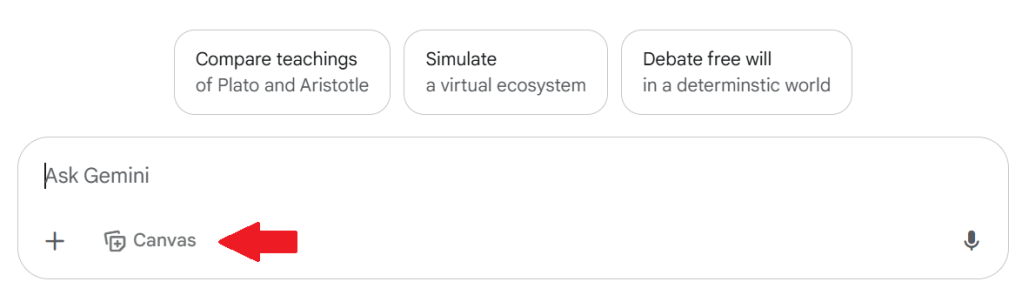
Put the following prompt into the chat but change or customize things to match your writing project, such as your desired word count and any additional things that might help your productivity. You can copy and paste it into Gemini if that is easiest.
Then, run it.
My prompt:
Create an app to track word count progress toward a goal of completing a book. I want to input my total daily word count and the app should show my daily word count as a visual chart, progress towards my goal of total word count. It should also include statistics on my average daily word count, and trends in my writing productivity in visual charts. Include a space for the title of my book and an area to include and edit notes. Include words of encouragement. Make it shareable with another author so we can see each other’s progress of my individual book and the other author’s own book.
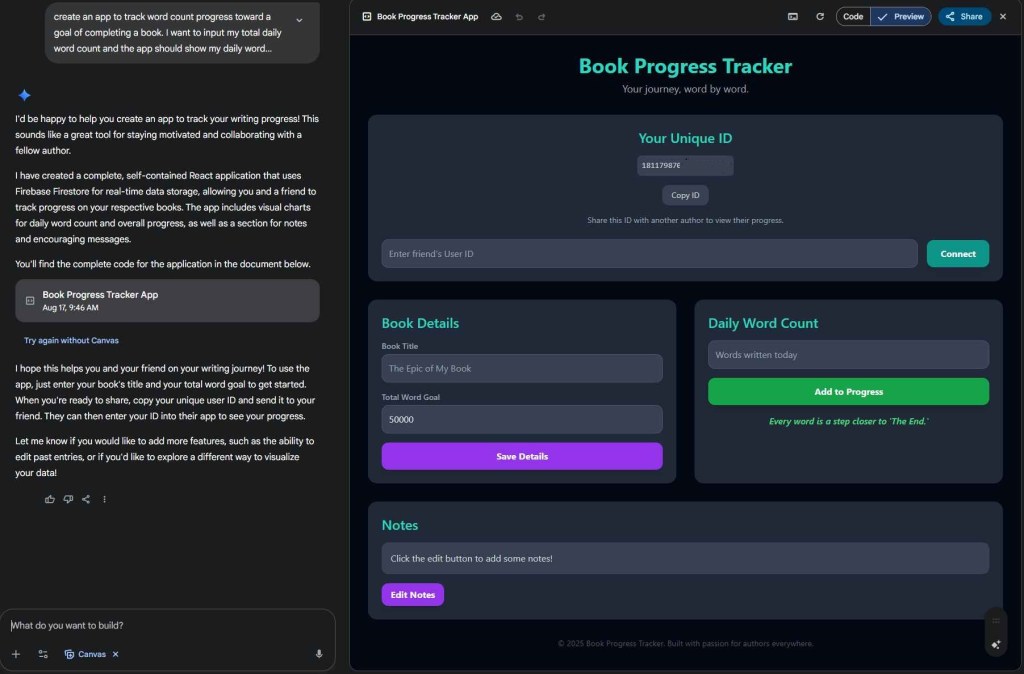
The result is a neat little productivity app you can use to input your daily word count and track your progress.
Did you find this post helpful? Please share it! We would also love to see what you wrote. Share your writing on social and tag us!

